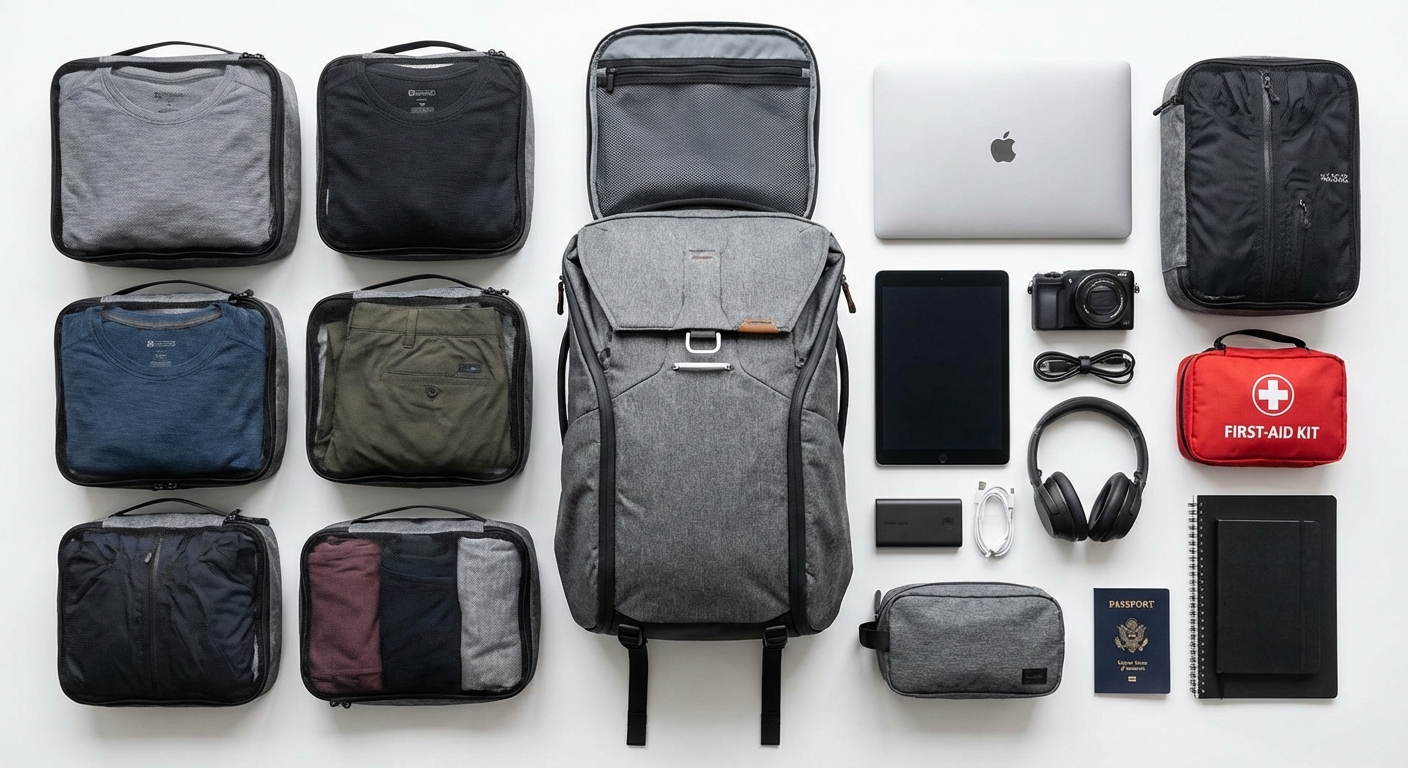
Your laptop bag is your entire office. Your backpack is your closet, medicine cabinet, and safety deposit box. When you work remotely from anywhere in the world, what you pack isn't just about comfort—it's about protecting your livelihood.
According to MBO Partners, there are now over 40 million digital nomads worldwide, with that number climbing every year. The United States alone has 18.5 million digital nomads, up 147% since 2019. With over 70 countries now offering dedicated digital nomad visas, this lifestyle has gone from fringe experiment to mainstream career choice.
But here's what nobody tells you when you're planning your first nomadic adventure: the wrong gear will sabotage your productivity faster than any timezone change or spotty WiFi ever could. A dead laptop battery during a client call. A stolen passport in a country where you don't speak the language. A backpack that destroys your shoulders after a single day of exploration.
I've refined this packing list over years of remote work across multiple continents. Every item here has earned its place through real-world testing—and plenty of items that seemed essential got left behind in hostels and Airbnbs because they weren't worth the weight.
This guide covers everything you need to work productively from anywhere: the tech that powers your mobile office, the bags that protect it all, the clothing that works across climates, and the systems that keep you organized when home is wherever you unzip your backpack.
In this guide:
- The Philosophy: Less is More
- Tech Essentials: Your Mobile Office
- Bags and Organization
- Clothing: The Capsule Wardrobe Approach
- Security and Documents
- Health and Comfort
- The Complete Packing Checklist
- Packing by Climate and Destination
- FAQ
The Philosophy: Less is More
Before we dive into specific gear, let's establish the mindset that separates struggling nomads from thriving ones: every gram you carry is a tax on your freedom.
The nomad who breezes through airports with a single carry-on isn't just saving money on baggage fees. They're saving energy for the work that actually matters. They're reducing decision fatigue. They're maintaining the flexibility to change plans when opportunity strikes—or when disaster demands it.
One-Bag vs. Two-Bag Travel
The digital nomad community splits into two camps:
One-bag travelers carry everything in a single backpack (typically 35-45L). This approach maximizes mobility and eliminates checked baggage entirely. It requires ruthless prioritization and investment in compact, multi-functional gear.
Two-bag travelers use a primary backpack plus a personal item (small daypack or laptop bag). This allows more comfort items and redundancy while still avoiding checked luggage on most airlines.
For most people starting out, I recommend the two-bag approach. One bag carries your clothing and larger items; the other holds your laptop and daily essentials. As you refine your kit over time, you can consolidate if that suits your travel style. Check out our one-bag travel guide for a deeper dive into minimalist packing, or see our first month packing guide for specific advice on those crucial early weeks.
Why Carry-On Only Matters
Beyond the obvious time savings at baggage claim, carry-on only travel provides:
- Peace of mind: Your livelihood (laptop, hard drives, documents) never leaves your sight
- Flexibility: Change flights, hop buses, take trains without luggage constraints
- Lower costs: No checked bag fees, which add up fast when you're moving frequently
- Faster transitions: Arrive and start working immediately instead of waiting at carousels
Know Your Limits
Airlines have become stricter about carry-on enforcement in 2026. Here's what you need to know:
Standard carry-on dimensions for most US airlines: 22 x 14 x 9 inches (56 x 36 x 23 cm) including handles and wheels.
International standards are often tighter: 21.5 x 15.7 x 9 inches (55 x 40 x 23 cm) is common in Europe and Asia.
Weight limits are increasingly enforced, especially on international routes: 15-22 lbs (7-10 kg) is typical. Budget carriers are the strictest—Ryanair, EasyJet, and Asian budget airlines will weigh your bag at the gate.
Pro tip: If you're flying a mix of carriers, pack to the strictest standard you might encounter. Nothing ruins a travel day like being forced to check your laptop bag or pay excessive fees at the gate.
Tech Essentials: Your Mobile Office
Your tech setup is the foundation of your nomadic income. Skimp here and you'll pay the price in lost productivity, missed deadlines, and expensive emergency replacements. This isn't where you cut costs.
Laptop: The Non-Negotiable Core
Your laptop is quite literally your income. For most digital nomads, this is the single most important purchase decision.
What to prioritize:
- Battery life: Minimum 10 hours real-world usage; 15+ is ideal
- Weight: Under 3 lbs for daily carry comfort
- Durability: Premium build quality survives café accidents and airport handling
- Performance: Enough power for your specific work (video editing needs more than copywriting)
| Laptop | Weight | Battery | Best For | Price Range |
|---|---|---|---|---|
| MacBook Air M3 | 2.7 lbs | 15-18 hours | Most digital nomads | $1,099-1,499 |
| Dell XPS 13 | 2.6 lbs | 13-15 hours | Windows users | $999-1,399 |
| MacBook Pro 14" | 3.4 lbs | 12-14 hours | Video editors, developers | $1,999-2,499 |
| ThinkPad X1 Carbon | 2.5 lbs | 10-12 hours | Business/enterprise work | $1,299-1,799 |
The MacBook Air M3 hits the sweet spot for most nomads: exceptional battery life, fanless silent operation, enough power for everything except heavy video work, and the reliability of the Apple ecosystem. At 2.7 lbs with genuine 18+ hour battery life, you can work a full day in a café without hunting for outlets.
For Windows users, the Dell XPS 13 offers comparable portability with solid performance. Just be prepared for shorter battery life compared to Apple Silicon.
For detailed laptop recommendations based on different work types, check out our guide to choosing the right laptop for remote work.
Power: Never Run Dry
Dead batteries end workdays. Here's how to prevent that:
Laptop Power Bank
The Anker 747 Power Bank (25,600mAh, 87W output) is the gold standard for laptop charging on the go. At 92.16Wh, it slides under the TSA's 100Wh limit for carry-on batteries. It'll give a MacBook Air a full charge or top off most laptops by 50-70%.
Key specs to look for in any laptop power bank:
- 87W+ output for fast laptop charging
- Under 100Wh capacity (TSA requirement)
- USB-C Power Delivery for universal compatibility
- Multiple ports to charge phone and laptop simultaneously
For phone charging on the go, a smaller 10,000mAh power bank serves as a lightweight backup. Read our deep dive on portable charging solutions for specific recommendations.
Travel Adapter
You need an adapter, not a converter. Modern electronics (laptops, phones, tablets) have universal power supplies that handle 100-240V automatically. You just need to physically connect to different outlet types.
The TESSAN Universal Travel Adapter works in 200+ countries with five charging ports (3 USB-C, 2 USB-A). One adapter, every country, all your devices charging simultaneously. See our complete travel adapter guide for more options.
Critical note: Adapters do NOT convert voltage. Don't plug in single-voltage devices like hair dryers or some older electronics—you'll fry them instantly.
Audio: Your Focus Shield
Coworking spaces, cafés, airports, Airbnbs with thin walls—your work environment will rarely be quiet. Noise-cancelling headphones aren't a luxury; they're productivity infrastructure.
Top picks for 2026:
The Sony WH-1000XM6 remains the benchmark for noise cancellation and sound quality. If you can only own one pair of headphones, these are it.
The Bose QuietComfort Ultra offers comparable noise cancellation with slightly better comfort for all-day wear. Excellent for long flights and marathon work sessions.
For a more portable option, true wireless earbuds like the Sony WF-1000XM5 or AirPods Pro fit in your pocket and deliver surprisingly effective noise cancellation.
See our complete breakdown of noise-cancelling headphones for detailed comparisons.
Ergonomics: Protect Your Body
Working from laptops destroys posture. Without intervention, you'll develop neck pain, shoulder issues, and potentially RSI. A few lightweight accessories prevent years of physical therapy:
Portable Laptop Stand
The Roost V3 weighs just 6 ounces (170g) and folds smaller than a water bottle, yet elevates your screen to eye level with adjustable height from 6-11 inches. It's an investment in long-term health that adds negligible weight to your pack.
Budget alternative: The Nexstand K2 delivers similar functionality at half the price, though slightly heavier and less compact. For a detailed comparison, see our Roost V3 vs Nexstand K2 breakdown.
When you raise your screen, you need a way to type:
External Keyboard & Mouse
A compact Bluetooth keyboard (like the Logitech K380 at 14 oz) and lightweight mouse complete your ergonomic setup. Combined with a laptop stand, you've essentially recreated a desktop workstation that weighs under a pound total.
For detailed recommendations, check our portable laptop stand guide.
Portable Monitor (Optional)
If your work benefits from dual screens, lightweight USB-C monitors add significant productivity. The 15.6" category offers the best balance of screen real estate and portability. See our portable monitor options for specific recommendations.
Additional Tech
Phone: Your backup communication, hotspot, navigation, and camera. Keep it in a quality case.
USB-C Hub: Expand your laptop's ports for external drives, monitors, and charging. Look for one with HDMI, USB-A ports, and SD card reader.
Cable Kit: USB-C cables (at least 2), one lightning cable if you have Apple devices, and any device-specific charging cables. Organize these in a tech pouch to avoid cable chaos.
Backup Storage: External SSD (500GB-1TB) for local backups. Cloud storage is great, but rural internet can make cloud access impossible.
Bags and Organization
Your bags are the containers for your entire life. Choose poorly and you'll suffer. Choose well and you'll forget you're carrying anything.
Primary Travel Backpack
For digital nomads, 40-45L capacity is the sweet spot—enough for a week's clothing plus all your gear, yet small enough to meet most carry-on requirements when packed thoughtfully.
Essential features:
- Laptop compartment: Padded, suspended from the bag's bottom, easily accessible
- Clamshell opening: Opens like a suitcase for easy packing/unpacking
- Comfortable harness: Padded shoulder straps, hip belt for weight distribution
- Durable materials: At minimum, look for 400D+ nylon with quality zippers
Popular choices include the Osprey Farpoint/Fairview 40, Peak Design Travel Backpack, and Tortuga Outbreaker. Each has trade-offs between weight, durability, and organization.
See our full travel backpack recommendations for detailed comparisons.
Day Pack / Laptop Bag
When you're settled in a location, you won't carry your full pack every day. A smaller 20-25L daypack holds your laptop, chargers, water bottle, and daily essentials while leaving the rest secured at your accommodation.
Key features for a nomad daypack:
- Dedicated laptop sleeve with padding
- Comfortable enough for 4-6 hours of walking
- Minimal bulk when empty (can compress into main pack if needed)
- Professional appearance for coworking spaces and meetings
For specific recommendations, check our guide to finding a laptop-friendly daypack.
Organization Systems
How you organize matters as much as what you carry.
Packing Cubes
Packing cubes transform a chaotic bag into an organized system. Designate cubes by category:
- Cube 1: T-shirts and base layers
- Cube 2: Underwear and socks
- Cube 3: Pants/shorts
- Compression cube: Bulkier items
When you check into accommodation, you can pull cubes directly into drawers without unpacking everything.
Tech Pouch
Your cables, adapters, chargers, and small electronics need their own dedicated organizer. A quality tech pouch prevents the "cable chaos" that wastes time when you're looking for one specific item.
Look for:
- Elastic loops for cables
- Padded sections for delicate electronics
- Mesh pockets for visibility
- Compact footprint
See our tech pouch recommendations for specific options, or check our Peak Design vs BAGSMART comparison if you're deciding between these popular choices.
Toiletry Bag
Hanging toiletry bags work best for nomads—you can hang them anywhere for immediate access without taking up counter space. Choose a bag with clear compartments so you can find items quickly. See our toiletry bag essentials guide for specific recommendations.
Clothing: The Capsule Wardrobe Approach
Clothing is where most new nomads over-pack dramatically. You don't need a different outfit for every day of the week. You need versatile pieces that mix, match, and perform.
The Merino Wool Advantage
Merino wool is the digital nomad's secret weapon:
- Odor-resistant: Wear pieces multiple times before washing
- Temperature regulating: Warm when cold, cool when warm
- Quick-drying: Hand wash in a sink, dry overnight
- Wrinkle-resistant: Looks presentable even from a stuffed backpack
- Lightweight: Warmer than synthetics at comparable weight
The higher upfront cost pays off in reduced clothing needs. Two merino t-shirts can replace five cotton ones because you can wear each 3-4 days between washes.
Building Your Capsule Wardrobe
The goal: 8+ outfit combinations from 6-8 pieces.
Base Layer (3-4 pieces):
- 2 merino wool t-shirts (neutral colors)
- 1 long-sleeve merino shirt (layering/sun protection)
- 1 button-down shirt (meetings, nicer occasions)
Bottoms (2-3 pieces):
- 1 versatile pants (chinos or travel pants that work café-to-dinner)
- 1 shorts (if climate appropriate)
- 1 athletic shorts (doubles as sleepwear and exercise)
Outerwear (1-2 pieces):
- 1 packable down jacket or fleece (compresses tiny, provides warmth)
- 1 rain shell (optional in dry climates)
Underwear & Socks:
- 3-4 merino wool boxer briefs
- 4-5 merino wool socks
Shoes (2-3 pairs max):
- 1 versatile sneaker (walking, casual, can dress up)
- 1 sandal or flip-flop (hostels, beaches, showers)
- 1 dressier option if your work requires it
For a complete breakdown of building a travel wardrobe, see our capsule wardrobe guide.
Climate Adaptability
The beauty of layers: your core wardrobe works across climates.
Cold weather: Add thermal base layer, beefier down jacket, and wool beanie—all packable Tropical: Subtract outerwear, add lightweight linen or quick-dry shirts Variable climates: The layering system handles 40-90°F (4-32°C) without major changes
Security and Documents
When your entire life fits in a backpack, losing that backpack—or its contents—becomes catastrophic. Here's how to protect yourself.
Physical Security
RFID-Blocking Wallet
Credit cards and passports with RFID chips can theoretically be skimmed by bad actors with readers. An RFID-blocking wallet or passport sleeve provides cheap insurance.
More importantly, a quality travel wallet organizes your essential cards and cash while surviving the abuse of constant travel. See our RFID-blocking wallet recommendations.
Money Belt or Hidden Pocket
For high-risk areas or large cash amounts, a slim money belt worn under clothing provides an extra security layer. Not for everyday use, but valuable for airport transit or unfamiliar cities.
Locks
TSA-approved cable locks for bags. Small combination padlocks for hostel lockers. Neither stops a determined thief, but they deter opportunistic grab-and-go theft.
Document Organization
Your critical documents need organization and backup:
Physical Documents to Carry:
- Passport (required for border crossings)
- Driver's license or other government ID
- Travel insurance card/policy number
- Credit cards (2+ from different networks for backup)
- Small amount of local currency + USD or EUR for emergencies
Keep these in a dedicated document organization solution within your bag.
Digital Backup Strategy
Assume your devices could be lost, stolen, or destroyed at any moment. Prepare accordingly:
Cloud Backup: All work files synced to cloud storage (iCloud, Dropbox, Google Drive). Enable automatic syncing.
Password Manager: Every login secured and accessible from any device. Bitwarden or 1Password are excellent choices.
Photo Copies: Scanned copies of passport, visa pages, and insurance documents stored in cloud storage AND emailed to yourself.
Two-Factor Authentication: Use an authenticator app, not SMS (which fails when you change SIM cards).
VPN and Digital Security
Public WiFi in cafés and coworking spaces is convenient but potentially dangerous. A VPN encrypts your traffic and protects sensitive data.
NordVPN and ExpressVPN remain top choices for reliability, speed, and server coverage. Monthly costs are minimal compared to the protection they provide.
Enable your VPN whenever you're on public WiFi. No exceptions.
Health and Comfort
Staying healthy while nomadic takes intentional effort. These items keep you functional when local pharmacies might have different products (or require prescriptions you can't get).
Toiletry Essentials
Pack travel-sized versions (3.4oz/100ml max for carry-on) of your non-negotiable products:
- Toothbrush + toothpaste
- Deodorant
- Sunscreen (SPF 30+ minimum)
- Moisturizer
- Razor (or electric trimmer)
- Any prescription medications in original containers
Pro tip: You can buy most toiletries anywhere. Don't over-pack. Bring enough for the first week, then buy locally.
First Aid Basics
A small first aid kit prevents pharmacy hunts for basic issues:
- Pain relievers (ibuprofen, acetaminophen)
- Anti-diarrheal (essential for developing countries)
- Antihistamines (allergic reactions, bug bites)
- Bandages and antiseptic wipes
- Blister bandages (you'll walk more than expected)
- Electrolyte packets (dehydration recovery)
- Any personal prescription medications (full supply + copies of prescriptions)
Sleep Essentials
Poor sleep destroys productivity. These items help you sleep anywhere:
- Eye mask: Block light in thin-curtained Airbnbs and overnight transport
- Earplugs: Foam earplugs or reusable silicone (Loop makes excellent options)
- Small travel pillow: Optional, but game-changing for long flights
- Melatonin: For timezone transitions (check legality in destination countries)
Comfort Items
These earn their weight in daily quality of life:
- Microfiber towel: Quick-drying, compact, serves as blanket/pillow in pinch
- Reusable water bottle: Staying hydrated matters; a good bottle lasts years
- Sunglasses: Protect your eyes and reduce eye strain
- Kindle or e-reader: Library access at negligible weight
The Complete Packing Checklist
Here's everything in one organized reference. Items marked with ★ are absolute essentials; others are highly recommended but adaptable to your needs.
Tech & Work
| Item | Est. Weight | Essential? |
|---|---|---|
| Laptop + charger | 3-4 lbs | ★ |
| Phone + charger | 0.5 lbs | ★ |
| Laptop power bank | 1.2 lbs | ★ |
| Universal travel adapter | 0.3 lbs | ★ |
| Noise-cancelling headphones | 0.5 lbs | ★ |
| External keyboard | 0.5-1 lb | Recommended |
| Travel mouse | 0.2 lbs | Recommended |
| Portable laptop stand | 0.4 lbs | Recommended |
| USB-C hub | 0.2 lbs | Recommended |
| Extra USB-C cables (2) | 0.1 lbs | ★ |
| External SSD | 0.1 lbs | Recommended |
| Portable monitor | 1.5-2 lbs | Optional |
| Small phone power bank | 0.4 lbs | Optional |
Bags & Organization
| Item | Est. Weight | Essential? |
|---|---|---|
| Primary backpack (40-45L) | 3-4 lbs | ★ |
| Day pack (20-25L) | 1-1.5 lbs | ★ |
| Tech pouch | 0.3 lbs | ★ |
| Packing cubes (set) | 0.5 lbs | ★ |
| Toiletry bag | 0.3 lbs | ★ |
| Laundry bag | 0.1 lbs | Recommended |
Clothing
| Item | Quantity | Est. Weight |
|---|---|---|
| Merino t-shirts | 2-3 | 0.5-0.75 lbs |
| Long-sleeve shirt | 1 | 0.3 lbs |
| Button-down shirt | 1 | 0.4 lbs |
| Versatile pants | 1-2 | 0.8-1.2 lbs |
| Shorts | 1 | 0.3 lbs |
| Athletic shorts | 1 | 0.2 lbs |
| Underwear | 4 | 0.4 lbs |
| Socks | 4-5 pairs | 0.3 lbs |
| Packable down jacket | 1 | 0.5-0.8 lbs |
| Rain shell | 1 | 0.4 lbs |
| Sneakers (worn) | 1 | — |
| Sandals | 1 | 0.5 lbs |
Security & Documents
| Item | Essential? |
|---|---|
| Passport | ★ |
| Driver's license/secondary ID | ★ |
| Travel insurance documents | ★ |
| Credit cards (2+ networks) | ★ |
| RFID-blocking wallet | ★ |
| Emergency cash (USD/EUR) | ★ |
| Small locks (2) | Recommended |
| Money belt | Optional |
Health & Comfort
| Item | Essential? |
|---|---|
| Prescription medications | ★ |
| First aid kit | ★ |
| Toiletries (basic) | ★ |
| Sunscreen | ★ |
| Eye mask | ★ |
| Earplugs | ★ |
| Microfiber towel | Recommended |
| Water bottle | Recommended |
| Sunglasses | Recommended |
| E-reader/Kindle | Optional |
Weight Target
Minimalist setup: 18-22 lbs total (meets most airline weight limits)
Comfortable setup: 25-30 lbs total (may require weighing on stricter airlines)
With portable monitor: Add 1.5-2 lbs
Packing by Climate and Destination
Your core packing list stays constant, but climate demands minor adjustments.
Tropical / Southeast Asia
Southeast Asia, Central America, and similar humid climates require:
Subtract:
- Heavy outerwear
- Wool socks (switch to thinner options)
- Layering pieces
Add:
- Lightweight, breathable shirts (linen or quick-dry synthetics)
- Extra sandals for daily wear
- Stronger sunscreen (SPF 50+)
- Bug repellent
- Rain poncho or packable umbrella (monsoon seasons)
The challenge in tropical climates is staying cool while maintaining a professional appearance for video calls. Linen shirts and breathable chinos work well.
Cold Weather / Northern Climates
Northern Europe, winter travel, and mountain destinations require layering up:
Add:
- Thermal base layer (top and bottom)
- Beefier down jacket (can replace packable layer)
- Wool beanie and gloves
- Thicker socks
- Scarf or neck gaiter
The layering system extends your temperature range significantly. A thermal base layer under your normal clothing plus your down jacket handles most cold weather without dedicated winter gear.
Urban vs. Adventure-Heavy
If your trip leans heavily toward outdoor activities (hiking, diving, climbing), you'll need activity-specific gear that falls outside this list. Consider:
- Dedicated hiking shoes
- Activity-appropriate clothing
- Sports-specific accessories
For most digital nomads who mix city work with occasional exploration, the standard list covers 90% of needs. Rent specialty gear locally for one-off activities rather than carrying it full-time.
FAQ
How much should my pack weigh?
For carry-on only travel, aim for 15-22 lbs (7-10 kg) as your target. This keeps you under most airline weight limits and comfortable for extended carrying.
Realistically, most digital nomads with full tech setups land in the 22-28 lb range. This works on most US carriers (no weight limits) but may trigger fees on European budget airlines or Asian carriers.
Weigh your packed bag before trips. If you're over 22 lbs, ask yourself what you could eliminate or whether a particular airline is worth the fee.
Can I work with just a tablet?
Technically, yes. Practically, it depends on your work.
Tablets work well for: Writing, email-heavy roles, basic design review, video calls, reading/research
Tablets struggle with: Complex spreadsheets, professional software (Photoshop, development environments), multi-window workflows, extended typing
If you're testing the nomad lifestyle for a few weeks, a tablet (especially iPad Pro with Magic Keyboard) might suffice. For long-term work, most people need a proper laptop for productivity and software compatibility.
What's the best bag size for one-bag travel?
35-40L is the sweet spot for most one-bag travelers. This capacity:
- Fits airline carry-on restrictions
- Holds a laptop, week's clothing, and essential gear
- Forces you to pack intentionally without excessive sacrifice
Smaller than 35L requires extreme minimalism or frequent laundry. Larger than 45L usually exceeds carry-on dimensions or tempts you to over-pack.
How do I pack electronics for TSA?
For US airport security:
- Laptops must come out of your bag and go in a separate bin (unless you have TSA PreCheck)
- Power banks must go in carry-on luggage, never checked (lithium battery regulations)
- Cameras, tablets, e-readers generally stay in bags unless the screener asks otherwise
- Cables and chargers can stay in bags inside a tech pouch
Keep your laptop in an easy-access compartment to speed up security. TSA-approved laptop bags that lay flat can sometimes skip removal, but this varies by airport.
For international travel, rules are similar but enforcement varies. When in doubt, pull it out.
Do I need a voltage converter?
Almost certainly not. Modern electronics (laptops, phones, tablets, cameras, most chargers) use "universal" power supplies that accept 100-240V input automatically. Check the fine print on your charger—if it says "INPUT: 100-240V," you only need a plug adapter, not a converter.
You DO need a converter for: Single-voltage devices like older American hair dryers, curling irons, and some American-market electronics. The safest approach is to leave these home and buy local versions or go without.
Pro tip: Buy a travel-sized dual-voltage hair dryer or curling iron if you need one. They're designed for this exact situation.
Conclusion
Packing for the digital nomad lifestyle isn't about having the best gear—it's about having the right gear for how you actually work and travel.
Remember the core principles:
-
Your laptop is your livelihood. Protect it above all else with quality bags, sufficient power backup, and proper insurance.
-
Every gram is a decision. The weight you carry determines how freely you move. Invest in lighter, multi-functional items rather than specialized single-use gear.
-
Quality over quantity. A single merino wool shirt that lasts years beats five cheap cotton shirts that fall apart. The same applies to bags, electronics, and every other category.
-
Flexibility over optimization. You don't know where you'll be next month. Pack for adaptability rather than perfectly optimizing for one destination.
This packing list has evolved over years of actual remote work across continents. Your list will evolve too. Pay attention to what you actually use and what stays buried at the bottom of your bag. After a few trips, you'll have refined your system to match your specific lifestyle.
Ready to go deeper?
- Explore our portable laptop stand guide for ergonomic work setups
- See our tech pouch recommendations for cable organization solutions
- Check the capsule wardrobe guide for detailed clothing strategies
- Read up on choosing the right laptop for remote work
- Find your perfect travel backpack
Pack light. Work hard. Explore endlessly.