Netgear Nighthawk M6 Pro Review: Is This Premium 5G Hotspot Worth $700?

This article contains affiliate links. We may earn a commission if you make a purchase through our links, at no extra cost to you.
I bought the Netgear Nighthawk M6 Pro after losing a $15,000 contract to a dropped connection. That Barcelona coworking space had unreliable WiFi, my phone tethering couldn't maintain a stable video call, and my client moved on to the next meeting. Expensive lesson.
Six months later, I've tested the M6 Pro across three continents, through countless video calls, and in conditions ranging from dense urban Tokyo to rural Portuguese villages. This review covers what works, what doesn't, and whether a $700 hotspot makes sense for your travel setup.
This article is part of our digital nomad connectivity guide, which covers everything from eSIMs to travel routers.
The Bottom Line
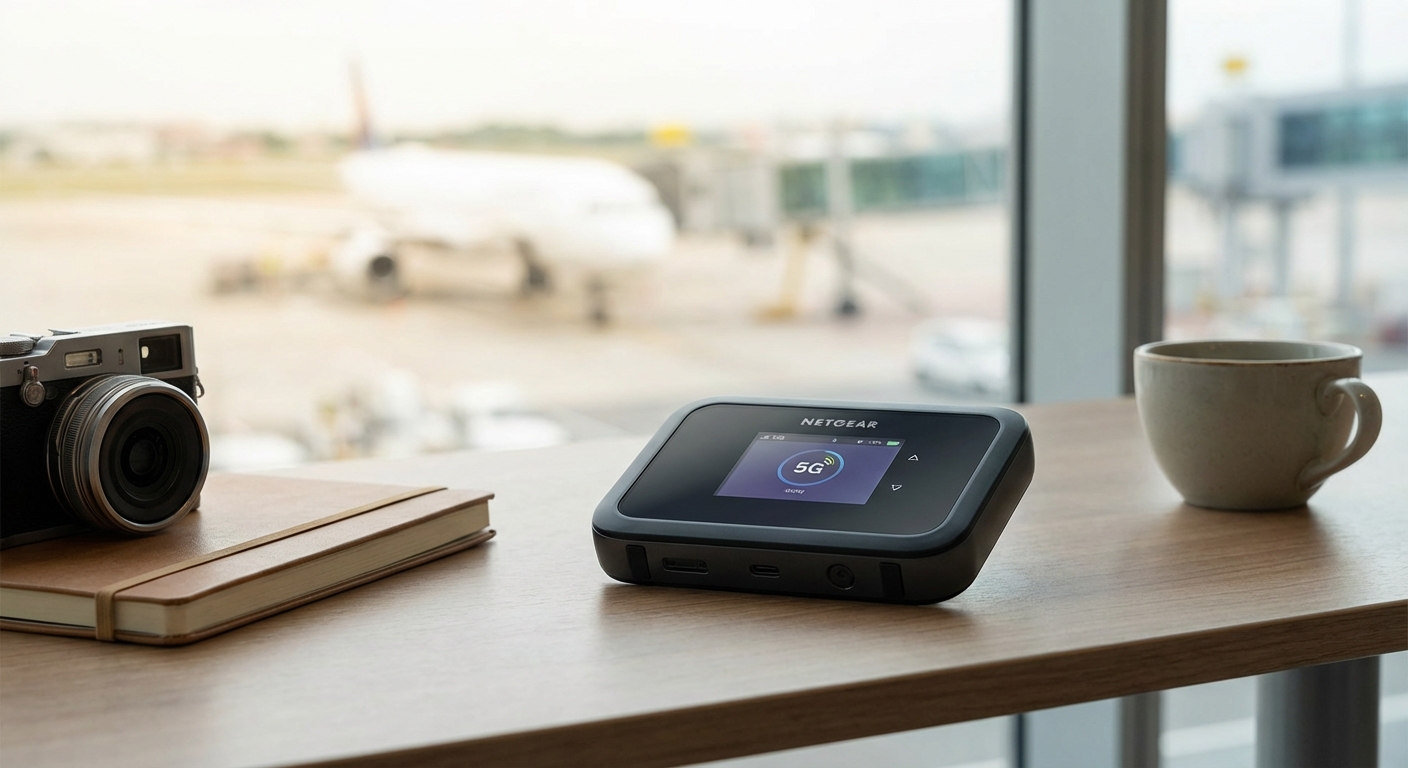
The Nighthawk M6 Pro is the most capable portable hotspot available. 5G speeds where coverage exists, WiFi 6E for blazing local connections, external antenna ports for signal boosting, and genuine all-day battery life. It's expensive, but for remote workers whose income depends on connectivity, it pays for itself.
Who should buy this: Remote workers with critical connectivity needs, travelers in areas with good 5G coverage, teams sharing connection, anyone who's lost money to unreliable internet.
Who should skip this: Budget travelers, occasional users, anyone primarily in areas without 5G coverage.
Key Specifications
| Spec | M6 Pro |
|---|---|
| Network | 5G Sub-6 + mmWave, 4G LTE fallback |
| Peak Speed | 4Gbps down, 660Mbps up |
| WiFi | WiFi 6E tri-band |
| Devices | Up to 32 simultaneous |
| Battery | 5040mAh, removable |
| Ports | USB-C, Ethernet, TS9 antenna |
| Display | 2.8" touchscreen |
| Weight | 280g |
| Price | $699 |
What I Like
Genuine 5G Performance
Where 5G coverage exists, the M6 Pro delivers transformative speeds. I've consistently seen 300-600 Mbps downloads in cities with good 5G infrastructure—faster than most home internet connections. Video calls are buttery smooth. Large file uploads that would take hours on 4G complete in minutes.
The mmWave support matters in dense urban areas. Walking through downtown Seattle, I maintained 1+ Gbps connections for several blocks near cell towers. Not useful everywhere, but remarkable when available.
External Antenna Support
This is the feature that separates professional hotspots from consumer devices. The M6 Pro includes two TS9 antenna ports. In areas with marginal signal, attaching external antennas can transform unusable connections into reliable ones.
I carry a pair of foldable 4G/5G antennas for exactly these situations. In a Portuguese farmhouse with one bar of signal, external antennas brought it to four bars and stable video calling. Worth the extra weight.
All-Day Battery Life
The 5040mAh battery genuinely lasts a full workday of active use—8+ hours with moderate usage, 6+ hours under heavy load. The removable battery means you can carry a spare for extended days or swap when the battery eventually degrades.
Quick charge support gets you to 50% in about 30 minutes. Useful for airport layovers.
WiFi 6E Local Performance
Connecting devices to the M6 Pro is notably faster than previous generations. WiFi 6E adds the 6GHz band, which is less congested and faster than traditional 2.4/5GHz. For file transfers between devices or streaming to the hotspot, this matters.
The 32-device limit handles group travel easily. I've connected a laptop, phone, tablet, e-reader, and smartwatch without any performance degradation.
Ethernet Out
The ethernet port lets you hardwire a laptop for maximum stability. During critical video calls, I plug in directly rather than relying on WiFi. The difference in reliability is noticeable.
You can also use the ethernet port for WAN input—connecting to hotel ethernet and broadcasting WiFi to your devices.
Touchscreen Interface
The 2.8" touchscreen makes managing connections simple without needing the app. Check data usage, switch networks, view signal strength—all directly on the device. The interface is responsive and intuitive.
What I Don't Like
The Price
$699 is serious money for a hotspot. You could buy a decent laptop for this price. The M6 Pro makes financial sense for remote workers billing significant hourly rates, but casual travelers should consider alternatives.
5G Coverage Remains Patchy
The M6 Pro's best features depend on 5G availability. Outside major metropolitan areas, you're falling back to 4G LTE—which the M6 Pro handles well, but a $250 4G device would do the same.
Before buying, check 5G coverage maps for your primary destinations. If you're mostly in areas without 5G, the premium isn't justified.
Size and Weight
At 280g, the M6 Pro is heavier than competitors. The form factor is chunky. This isn't a device that disappears in your pocket—it needs bag space. For ultralight travelers, this matters.
Data Plans Are Expensive
The device is just the beginning. 5G data plans capable of utilizing these speeds aren't cheap. Budget $50-150 monthly for meaningful data, depending on carrier and usage.
Carrier Locking Issues
Some carriers sell locked versions. Verify you're buying the unlocked model for international use. Unlocking carrier-locked units can be frustrating.
Real-World Performance Testing
Urban 5G - Tokyo
In central Tokyo with excellent 5G coverage, the M6 Pro consistently delivered 400-700 Mbps downloads. Video calls were flawless. Large file uploads completed quickly. This is where the device shines.
Urban 4G - Lisbon
In Lisbon with 4G LTE, speeds ranged from 30-80 Mbps—good, but achievable with cheaper devices. The M6 Pro's 4G performance is excellent, but you're not getting 5G premium value.
Rural - Portuguese Countryside
In rural areas with marginal signal, the external antenna ports proved essential. Without antennas: unusable connection. With antennas: stable 15-25 Mbps, sufficient for video calls with some compression.
Worst Case - Remote Island
On a Greek island with minimal infrastructure, even the M6 Pro struggled. Some areas simply lack adequate cellular coverage. No hotspot, regardless of price, can solve infrastructure problems.
M6 Pro vs M6 - Which to Choose?
Netgear also sells the Nighthawk M6 at $499—same 5G capability, but without mmWave, WiFi 6E, or the premium touchscreen.
Choose M6 Pro if:
- You frequently work in dense urban areas with mmWave
- WiFi 6E local performance matters
- You want the better touchscreen interface
- Budget isn't primary concern
Choose M6 if:
- You want 5G capability at lower cost
- mmWave coverage is limited in your areas
- WiFi 6 is sufficient for your devices
- $200 savings matters
For most travelers, the standard M6 at $499 offers better value. The M6 Pro's premium features are situationally useful.
For our full comparison of portable hotspots including both models, see the best portable WiFi hotspots guide.
How It Compares to Alternatives
vs Phone Tethering with eSIM
Phone tethering is cheaper and doesn't require extra gear. But: battery drain, weaker antennas, hotspot restrictions on many eSIM plans. The M6 Pro wins on reliability and multi-device support.
For eSIM recommendations that work well with tethering, see best eSIMs for digital nomads.
vs GlocalMe G4 Pro
The GlocalMe at $179 offers cloud SIM convenience plus physical SIM flexibility. It's 4G only and slower, but adequate for most use cases at a quarter the price. For casual travelers, GlocalMe makes more sense.
vs Travel Router Plus eSIM
A travel router plus eSIM often costs less and provides similar functionality—but requires available WiFi or phone tethering. The M6 Pro provides cellular connectivity independently. Different tools for different situations.
Who Should Buy the Nighthawk M6 Pro
Remote workers with critical calls. If a dropped connection costs you money or reputation, the M6 Pro's reliability is worth the investment.
Travelers in 5G-covered areas. If your primary destinations have good 5G infrastructure, you'll actually use the premium features.
Group travelers. Connecting multiple people to one reliable hotspot beats everyone buying separate plans.
Power users needing maximum speeds. Large file transfers, cloud-based work, streaming—the M6 Pro handles demanding workloads.
Signal-challenged situations. The external antenna ports can save otherwise impossible connectivity situations.
Who Should Skip It
Budget travelers. Cheaper options exist that handle 90% of use cases.
Casual users. If you only need occasional connectivity, phone tethering or basic hotspots suffice.
Travelers in 4G-only areas. Without 5G, you're paying for capability you can't use.
Ultralight packers. The size and weight may not fit minimalist setups.
Verdict
The Netgear Nighthawk M6 Pro is the best portable hotspot available—if you can justify the price and travel where 5G exists. For remote workers whose income depends on connectivity, it's a business expense that pays for itself. For casual travelers, the standard M6 or GlocalMe G4 Pro offers better value.
I've kept the M6 Pro as my primary hotspot after six months of testing. The peace of mind during critical calls is worth the premium. But I also carry backup options—no single device is perfect everywhere.
For a complete connectivity setup including backup strategies, explore our complete digital nomad connectivity guide.
Frequently Asked Questions
Does the M6 Pro work internationally?
Yes, with unlocked units and compatible SIM cards. Verify you're buying the unlocked version. Band compatibility varies by region—the device supports most global bands but check specific country requirements.
How long does the battery actually last?
Real-world usage: 6-8 hours of active use, longer with intermittent usage. Heavy video streaming or continuous file transfers drain faster. The removable battery means you can carry spares.
Can I use the M6 Pro as my only internet?
Depends on your data needs and location. In areas with good coverage and affordable data plans, yes. But cellular data caps and costs can add up for heavy users. Most nomads use it as primary mobile connection with WiFi as backup.
Is the M6 Pro future-proof?
As future-proof as cellular devices get. 5G, WiFi 6E, and the feature set will remain relevant for years. Eventually, newer standards will emerge, but this device should serve well for 3-5 years.
What SIM card does it use?
Standard nano-SIM. Works with any compatible carrier SIM. For international use, consider international data SIMs or local SIMs in each country.
Netgear Nighthawk M6 Pro - Premium 5G Mobile Hotspot

Netgear Nighthawk M6 Pro
Premium 5G Mobile Hotspot
The flagship 5G mobile hotspot with WiFi 6E, mmWave support, and professional-grade features.
The flagship 5G mobile hotspot with WiFi 6E, mmWave support, and professional-grade features. External antenna ports, ethernet out, and all-day battery life for mission-critical connectivity.
What We Like
❝When connectivity is mission-critical, this delivers. 5G speeds where available are genuinely transformative—video calls feel like being on fiber.❞
Review of What We Liked
Premium 5G Mobile Hotspot
The flagship 5G mobile hotspot with WiFi 6E, mmWave support, and professional-grade features.
About the Author